
In networking, a “node” is any physical or virtual device connected to a network that can send, receive, or forward data—such as a computer, server, gaming console, smart TV, or crypto-miner. [1, 2]
When it comes to port forwarding, nodes matter because your router sees your entire local network as a single entity from the outside. Without mapping traffic to specific nodes, communication from the internet breaks down. [1, 2]
1. The “Single Entrance” Problem (NAT)
Your internet provider assigns one public IP address to your router. Every device (node) inside your house shares this single public IP. [1, 2, 3]
- When a node inside your house initiates a connection (like opening a webpage), the router remembers which node asked for it and passes the reply back. [1]
- But when an external device tries to connect to you unsolicited (like a friend joining your hosted Minecraft server or a blockchain peer syncing data), the router receives data at your public IP and doesn’t know which internal node should get it. It drops the traffic by default for security. [1, 2, 3]
2. Differentiating Between Multiple Nodes
Port forwarding solves this by creating a specific rule: “Any traffic arriving from the internet on Port X must go directly to Node Y.” [1, 2]
Nodes matter heavily here because you cannot forward the same port to two different nodes. If you run multiple nodes doing the same task on your network, you have to stagger the external ports: [1]
- Node 1 (Gaming PC –
192.168.1.10): Forward external port25565→ internal port25565. - Node 2 (Home Server –
192.168.1.20): Forward external port25566→ internal port25565. [1, 2, 3]
3. Decoupling Decentralized P2P Networks
If you are running a blockchain, crypto, or torrent node (like Bitcoin, Ethereum, or Storj), port forwarding dictates how useful your node is to the rest of the network. [1, 2, 3]
- Without Port Forwarding: Your node can only make outbound connections. It functions, but it acts as a passive consumer. Other nodes cannot reach into your network to pull data or sync from you. [1, 2, 3, 4]
- With Port Forwarding: Your node becomes a “hub” that accepts inbound traffic. It actively strengthens the decentralized network by allowing any random peer on the internet to connect, fetch, and validate blocks or files through you. [1, 2, 3]
Summary of Component Roles
| Component | Real-world Analogy | What it does in Port Forwarding |
|---|---|---|
| Public IP Address | The building’s street address | Gets the data from the internet to your router. |
| External Port | The specific office room number | Tells the router what kind of traffic is arriving. |
| Internal Node (Private IP) | The specific person working in that office | The exact physical device designated to process that data. |
So nodes are devices within a network?
Yes, exactly! In computer networking, a node is any device connected to a network that can send, receive, create, or store data.
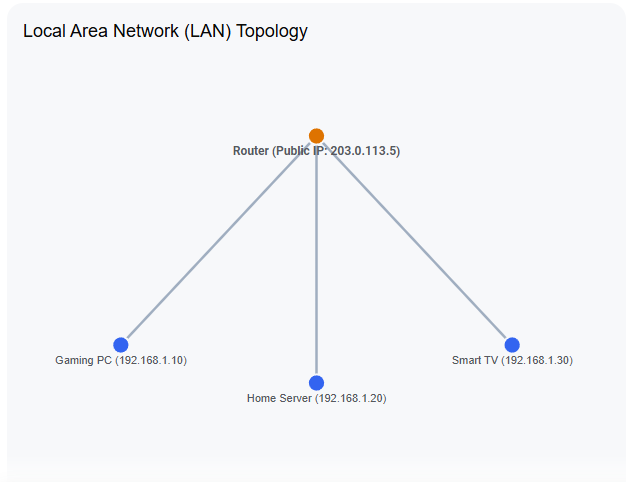
To help visualize how these nodes interact with a router and why they matter for port forwarding, look at this simple network map:
If it has an IP address, it’s a node
Every single device in the diagram above is a node. If you look around your room, almost anything connected to your Wi-Fi or Ethernet cable is a node:
- Your smartphone and laptop
- A gaming console (PlayStation, Xbox, Switch)
- A smart home device (like a smart bulb, security camera, or thermostat)
- The router itself (which acts as the central node connecting your local network to the internet)
Why this distinction is vital for Port Forwarding
When you set up port forwarding, you are telling your router: “When data arrives from the internet on this specific port, do not guess what to do with it. Send it directly to this exact node.”
Because every node on your local network has its own unique local identifier—called a Private IP address (like 192.168.1.10)—the router uses that IP address to ensure the internet traffic lands on the correct device. Without defining the specific node, the router wouldn’t know whether a gaming packet belongs to your PC, your phone, or your smart TV, and it would simply discard the data.
Geef een reactie