
IPv4 address exhaustion is the depletion of the global pool of unallocated 32-bit internet addresses (~4.3 billion unique values). This problem was triggered by the exponential growth of the internet, mobile devices, and IoT. The Internet Assigned Numbers Authority (IANA) officially exhausted its central free pool of IPv4 blocks on February 3, 2011, distributing its final chunks evenly to the five Regional Internet Registries (RIRs). [1, 2, 3, 4, 5]
Since then, the RIRs have transitioned from broad administrative distribution to strict rationing, waiting lists, and supporting the private transfer/leasing market. [1, 2, 3]
Current Status of the 5 RIRs
Every RIR has officially entered a stage of IPv4 depletion, meaning they can no longer hand out large blocks of IP addresses to support significant new network infrastructure. Instead, they enforce “soft-landing” policies, reserving tiny pools exclusively to help members transition to IPv6. [1, 2, 3]
| Regional Internet Registry (RIR) | Region Covered | Depletion / Hard Rationing Milestone | Current Allocation Policy Strategy |
|---|---|---|---|
| APNIC | Asia-Pacific | 2011 | Rations a maximum of a single /23 block (512 addresses) per member from its final pool. |
| LACNIC | Latin America & Caribbean | 2015 / 2020 | Allocates strictly small blocks exclusively via a waiting list for IPv6 transition. |
| ARIN | North America | 2015 | Free pool fully depleted. Issues addresses strictly via a waiting list of recovered space. |
| RIPE NCC | Europe, Middle East, Central Asia | 2019 | Fully exhausted its main pool in November 2019. Maintains a waiting list for small single /24 allocations (256 addresses) from recovered space. |
| AFRINIC | Africa | Phase 1: 2017 / Phase 2 ongoing | Operates under a strict Phase 2 soft-landing policy, rationing allocations between a /24 and a /22 block. |
How the Industry Adapts
Because the protocol still works and remains critical for backward compatibility, organizations rely on alternative mechanisms to survive the squeeze: [1, 2, 3]
- The Transfer & Leasing Market: IPv4 has transformed from a free administrative resource into a highly valued commercial asset. Companies buy or lease space from secondary markets. As of mid-2026, buying costs hover around $23.50 per address in the market, while leasing averages roughly $0.35 per IP per month on platforms like IPXO. [1, 2]
- Carrier-Grade NAT (CGNAT): Service providers use Carrier-Grade NAT to allow thousands of private networks to share a single public IPv4 address, stretching their existing inventory as far as possible. [1, 2]
- IPv6 Transition: The absolute, long-term solution is migrating to IPv6, which uses 128-bit addresses to provide an virtually inexhaustible supply (3.4 × 10³⁸) of unique coordinates. However, adoption remains a gradual process due to high deployment costs, lack of backward compatibility, and the necessity of running complex dual-stack networks in the interim. [1, 2, 3]
How public lever masquerading saves millions of IPs
IP masquerading—historically rooted in Linux systems and commonly recognized today as a specialized dynamic type of Network Address Translation (NAT) or Port Address Translation (PAT)—acts as a critical economic and technical lever that saves millions of public IP addresses every day. [1, 2]
- The Masking Mechanism: Instead of allocating a unique, globally routable public IPv4 address to every single device inside a network, a gateway router hides an entire internal private network behind a single public IP address assigned to its external interface. [1, 2, 3]
- Dynamic Translation: When an internal node (such as a phone, server, or computer) sends data to the internet, the router intercepts the packet, modifies its source information, and “masquerades” the traffic as if it originated solely from the router’s public IP. It dynamically assigns unique port numbers to keep track of which internal device belongs to which internet session. [1, 2, 3]
- Preservation Impact: By serving as a structural buffer, masquerading ensures that homes, corporate offices, and local data centers can scale their internal nodes infinitely using free, non-routable private IP addresses (like
192.168.x.xor10.x.x.x). [1, 2]
Without this dynamic translation lever operating silently at the edge of almost every local network, the global pool of 4.3 billion IPv4 addresses would have collapsed entirely decades ago, long before IPv6 infrastructure could be deployed.
How shared IPs protect User Privacy
While shared IP addresses—achieved through IP masquerading, NAT, and Carrier-Grade NAT (CGNAT)—were originally designed to combat IPv4 address exhaustion, they have unexpectedly become one of the most powerful everyday tools for protecting end-user privacy.
- The “Crowd” Effect: When thousands of distinct nodes (users and devices) share a single public IP address, it creates a massive digital crowd. To external websites, data brokers, and trackers, all traffic coming from that shared IP looks like it belongs to a single, giant entity rather than individual people.
- Breaking the Tracking Trail: Websites routinely use IP addresses to build behavioral profiles, track browsing history, and target ads. By blending your internet traffic with hundreds of your neighbors or fellow corporate employees, shared IPs make it mathematically difficult to isolate and fingerprint your specific device based on the IP address alone.
- Obfuscating Physical Location: A shared public IP address only reveals the location of the gateway or service provider’s data center, not the actual home or office of the user. This creates a natural layer of geographic obfuscation, preventing malicious actors or intrusive platforms from pinpointing your exact physical node.
By turning a scarce technical resource into a shared public utility, network architecture inadvertently built a foundational layer of anonymity that shields everyday internet users from targeted tracking.
So is this linked to IPv4 exhaustion?
Ja, absoluut. Dit is rechtstreeks en onlosmakelijk verbonden met de uitputting van IPv4-adressen. Sterker nog: zonder de druk van de IPv4-schaarste zouden we tegenwoordig waarschijnlijk helemaal geen gedeelde IP-adressen gebruiken.
De directe link tussen IPv4-uitputting, masquerading en privacy werkt als volgt:
- De noodzaak zorgde voor de techniek: Omdat de 4,3 miljard IPv4-adressen opraakten, móésten internetproviders en netwerkbeheerders wel overstappen op technologieën zoals NAT, IP-masquerading en Carrier-Grade NAT (CGNAT). Het hoofddoel hiervan was puur technisch: duizenden apparaten (nodes) online houden met slechts één schaars openbaar IP-adres.
- Privacy als onbedoeld bijeffect: Privacy was nooit het oorspronkelijke doel van deze technieken; het is een toevallig bijproduct (een ‘bijwerking’) van de oplossing voor de IPv4-schaarste. Omdat internetproviders gedwongen waren om duizenden klanten op hetzelfde IP-adres te zetten om adressen te besparen, ontstond er automatisch een “digitale menigte” waarin individuele gebruikers plotseling anoniem werden voor de buitenwereld.
Hoe IPv6 dit privacyvoordeel weer kan veranderen
De link met IPv4-uitputting wordt nog duidelijker als we kijken naar de toekomst met IPv6:
Met IPv6 is er zóveel adresruimte dat IPv4-uitputting geen rol meer speelt. Elk apparaat op aarde kan weer een uniek, eigen openbaar IP-adres krijgen.
Hoewel dit technisch perfect is, verdwijnt hierdoor het automatische privacyvoordeel van de “digitale menigte”. Omdat netwerkbeheerders dit beseften, moesten er voor IPv6 speciaal nieuwe privacy-extensies (zoals IPv6 Privacy Extensions) worden ontworpen om de tracking-risico’s op te vangen die bij IPv4 gratis werden opgelost door de schaarste.
Showing IPv6 Privacy Extensions Status in Windows 11
Windows 11 – How to permanently disable temporary IPv6 address – Mi…
https://learn.microsoft.com/en-us/answers/questions/1195611/windows-11-how-to-permanently-disable-temporary-ip
IPv6 Privacy Extensions: What They Are and How to Enable
https://ipaddresslocation.net/articles/ipv6-privacy-extensions-what-they-are-and-how-to-enable
How to Enable and Disable Temporary IPv6 Addresses – PerfCode
https://en.perfcode.com/windows/issues/enable-disable-temporary-ipv6-address
You can check easily whether IPv6 privacy extensions (temporary addresses) are enabled on your Windows 11 device using built-in commands.
Method 1: Using PowerShell
- Click the Start menu, type PowerShell, and select Run as administrator.
- Enter Get-NetIPv6Protocol | Format-List to view current IPv6 protocol settings, including RandomizeIdentifiers and UseTemporaryAddresses.
Method 2: Using Command Prompt (netsh)
- Click the Start menu, type cmd, and select Run as administrator.
- Enter netsh interface ipv6 show privacy to display the current privacy extension status.
Method 3: Listing Current IPv6 Addresses
- Open PowerShell as administrator.
- Enter Get-NetIPAddress -AddressFamily IPv6 | Where-Object SuffixOrigin -eq ‘Random’ to list temporary IPv6 addresses currently assigned.
The Dual-Stack Era: Running Both Protocols to Survive
The transition from IPv4 to IPv6 could not happen overnight because the two protocols are completely incompatible—an IPv6-only device cannot communicate directly with an IPv4-only server. To prevent global internet disruption during this prolonged transition, networks entered the Dual-Stack era, a resource-intensive survival strategy where infrastructure must run both protocols simultaneously.
- Simultaneous Operations: Under a dual-stack configuration, every network interface, router, and firewall within an organization is assigned both an IPv4 address and an IPv6 address. The system dynamically chooses the best path: it uses IPv6 when connecting to modern platforms and seamlessly drops back to IPv4 when accessing legacy infrastructure.
- The Financial and Operational Burden: Dual-stack is not an elegant choice, but a necessity for survival. It doubles the administrative workload for network engineers, complicates security policies, and increases overhead on hardware routers, which must maintain two completely separate routing tables at all times.
- The Paradox of IPv4 Scarcity: Ironically, dual-stack networks do not instantly solve IPv4 exhaustion—they actually intensify the pressure in the short term. To build a dual-stack network and remain visible to the legacy internet, an organization still requires a scarcer-than-ever IPv4 address for every new deployment alongside its vast new IPv6 allocation.
This overlapping era has turned into a decades-long bridging phase. Organizations are forced to bear the high maintenance costs of running dual infrastructures simply to stay reachable to all corners of the global market while waiting for the legacy IPv4 world to finally fade away.
Has Sorce NAT and NAT has anything to do with this transition? Source Network Address Translation
Ja, absoluut. Zowel NAT (Network Address Translation) in het algemeen als Source NAT (SNAT) in het bijzonder spelen een gigantische en cruciale rol in deze transitie. [1, 2]
Sterker nog: ze zijn getransformeerd van hulpmiddelen om IPv4-adressen te besparen naar de belangrijkste bruggen die ervoor zorgen dat het internet tijdens de overgang naar IPv6 niet in tweeën splitst. [1, 2]
Omdat IPv4 en IPv6 totaal verschillende talen spreken en niet rechtstreeks met elkaar kunnen communiceren, worden NAT en SNAT op de volgende manieren ingezet om de transitie te overleven: [1]
1. De rol van Source NAT (SNAT) bij IPv6-naar-IPv4 (NAT64)
Veel moderne netwerken (zoals grote mobiele 4G/5G-netwerken of datacenters) willen intern IPv6-only draaien om van het IPv4-beheer af te zijn. Maar als een IPv6-only smartphone een website wil bezoeken die alleen nog een oud IPv4-adres heeft, kan dat niet rechtstreeks. [1, 2, 3]
Hier komt een transitiemechanisme genaamd NAT64 in actie, dat zwaar leunt op Source NAT: [1, 2]
- De router/firewall vangt het IPv6-pakket op dat naar het IPv4-internet wil.
- De router voert Source NAT (SNAT) uit: hij stript de IPv6-header van het pakket en vervangt het bronsignaal door een schaars, openbaar IPv4-adres uit een gedeelde pool.
- De website ziet een normaal IPv4-verzoek binnenkomen en antwoordt. De router vertaalt dit vervolgens weer terug naar IPv6. [1, 2, 3]
Dankzij SNAT kunnen miljoenen nieuwe IPv6-apparaten naadloos communiceren met de erfenis van het oude IPv4-internet, zonder dat die apparaten zelf een IPv4-adres nodig hebben. [1, 2]
2. NAT als alternatief voor Dual-Stack (Adresbesparing)
Zoals in de vorige sectie is beschreven: het draaien van een Dual-Stack netwerk (waar elk apparaat verplicht een IPv4- én een IPv6-adres heeft) loodzwaar en duur. Er zijn simpelweg niet genoeg IPv4-adressen om elk nieuw IPv6-apparaat ook een IPv4-identiteit te geven. [1, 2]
Hierdoor vormt Carrier-Grade NAT (CGNAT) (een grootschalige vorm van Source NAT bij de internetprovider) de reddingsboei: [1, 2]
- In plaats van dat een provider een kostbaar IPv4-adres aan een dual-stack klant geeft, deelt de provider intern alleen private IPv4-adressen en IPv6-adressen uit. [1, 2]
- Pas aan de rand van het netwerk van de provider zorgt de Source NAT-laag ervoor dat duizenden klanten via één enkel openbaar IPv4-adres naar het oude internet worden geleid. [1, 2]
Samengevat
NAT en Source NAT zijn verschoven van een tijdelijke pleister voor IPv4-schaarste naar de essentiële vertaalmachines
The Two Scales of Source NAT: Local vs. Carrier-Grade
Source Network Address Translation (SNAT) is the foundational mechanic that allows multiple devices to hide behind a single IP address. However, as the IPv4 pool reached critical depletion, network engineers had to deploy SNAT at two entirely different scales to keep the internet functioning.
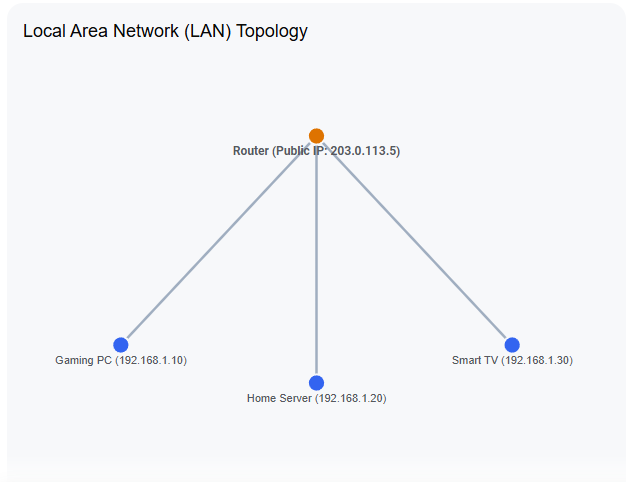
- Local SNAT (The Home Scale): This is the traditional NAT running on your consumer router. Your router takes all internal nodes (laptops, phones, smart TVs) with private IPs (e.g.,
192.168.1.x) and uses SNAT to rewrite their source headers to match the single public IP address provided by your Internet Service Provider (ISP). - Carrier-Grade NAT / Massive SNAT (The Provider Scale): As public IPv4 addresses became too scarce and expensive for ISPs to give one to every single household, providers stopped handing out unique public IPs to homes. Instead, they deployed Carrier-Grade NAT (CGNAT)—essentially a massive, high-throughput SNAT infrastructure at the core of their own network that multiplexes thousands of entire households behind a single public IP address.
The Two-Stage Process (Double NAT)
Because both scales of SNAT must coexist to survive the current IPv4 landscape, traffic originating from a local node often has to pass through a Two-Stage Process before it ever reaches the public internet. This creates a multi-layered translation environment:
[ Local Node ] (Private IP: 192.168.1.10) │ ▼┌────────────────────────────────────────┐│ STAGE 1: Local SNAT (Home Router) │ │ Translates 192.168.1.10 to 100.64.0.15 │└────────────────────────────────────────┘ │ ▼[ ISP Network ] (CGNAT Private IP Pool: 100.64.0.0/10) │ ▼┌────────────────────────────────────────┐│ STAGE 2: Massive SNAT (ISP Core) ││ Translates 100.64.0.15 to 203.0.113.5 │└────────────────────────────────────────┘ │ ▼[ Public Internet ] (Global Destination)
- Stage 1: The Local Translation. A device inside the home (e.g.,
192.168.1.10) sends a packet. The home router performs the first round of SNAT, translating the private IP into a Carrier-Grade private IP assigned by the ISP (typically from the reserved100.64.0.0/10address block). - Stage 2: The Carrier Translation. The packet travels to the ISP’s data center. The provider’s massive CGNAT routers perform a second round of SNAT, stripping the carrier-private IP and translating it into a shared, globally routable public IPv4 address (e.g.,
203.0.113.5) before sending it to the destination website.
While this two-stage process successfully saves millions of IPv4 addresses globally, it adds processing overhead and breaks traditional inbound port forwarding, making it difficult for local nodes to host servers without specialized transition tools.
CGNAT stands for Carrier-Grade Network Address Translation. It is a method used by internet service providers (ISPs) to let multiple customers share a single public IPv4 address. [1, 2]
Why ISPs Use CGNAT
- IPv4 Shortage: The world has run out of unique public IPv4 addresses.
- Address Sharing: CGNAT lets an ISP assign one public IP address to hundreds or thousands of different homes or mobile devices at the same time.
- Cost Savings: It delays the need to buy expensive new IPv4 addresses while the internet slowly transitions to IPv6. [1, 2, 3]
How CGNAT Works
- Your Router: Your home router gets a private local IP address from the ISP instead of a public one.
- The Carrier: When your data reaches the provider’s network, their CGNAT equipment translates your private address into a shared public IP address before sending it out to the wider internet.
- Port Multiplexing: It uses port numbers to track which data belongs to which user. [1, 2, 3]
Limitations of CGNAT
- No Direct Inbound Connections: You cannot easily set up port forwarding. [1]
- Hosting Issues: Running a home server, security camera system, or certain peer-to-peer multiplayer video games can fail or become difficult. [1, 2]
- Shared Reputation: If another user sharing your public IP address behaves badly on a website, your access to that specific site might get blocked or flagged.
But how does this break inbound port forwarding?
To understand why Carrier-Grade NAT (CGNAT) breaks port forwarding, it helps to look at how traditional port forwarding works versus how CGNAT changes the rules.
In short: Port forwarding requires control over the public IP address, but under CGNAT, your ISP controls it, not you.
Here is the step-by-step breakdown of why it breaks:
1. The Double-NAT Problem (Two Barriers)
In a standard home network, you have one layer of Network Address Translation (NAT) managed by your home router:
- Your Local Network: Your devices have private IPs (like
192.168.1.X). - Your Router: Has a unique, dedicated Public IP address facing the internet.
When you set up port forwarding, you tell your router: “If traffic comes to my Public IP on Port 80, send it directly to my private computer at 192.168.1.5.”
Under CGNAT, a second layer is added by the ISP:
- Your Router: No longer gets a public IP. Instead, it gets a private WAN IP (usually starting with
100.64.X.X). - The ISP’s CGNAT Router: Holds the actual Public IP address and shares it among hundreds of households.
2. Traffic Gets “Lost” at the ISP Level
When an outside device tries to connect to your home server, it sends traffic to the shared Public IP address on a specific port.
Because you do not own that Public IP exclusively, your home router never sees that incoming traffic. The traffic hits the ISP’s CGNAT router first. The ISP’s router looks at the incoming packet, realizes it didn’t request this data from the inside, doesn’t know which of the 500 shared households it belongs to, and instantly drops the connection.
You can configure port forwarding rules on your home router all day, but they are useless because the traffic is blocked before it ever reaches your house.
Direct Comparison: Normal Internet vs. CGNAT
| Feature | Standard Internet (No CGNAT) | CGNAT Internet |
|---|---|---|
| Your Router’s WAN IP | Public & Unique | Private (Shared with others) |
| Who controls the Public IP? | You (via your router) | Your ISP |
| Inbound Port Forwarding | Works (Direct path available) | Broken (Blocked at the ISP level) |
How to Bypass This Limitation
If you need to host a game server, access a home security camera, or use Plex, you can bypass CGNAT using these methods:
- Ask for a Static IP: Many ISPs will grant you a dedicated public IPv4 address for a small monthly fee, which completely removes you from the CGNAT pool.
- Use IPv6: If your ISP and router support IPv6, CGNAT isn’t used for that traffic. Every device gets its own public IPv6 address, making port forwarding unnecessary (though you still have to allow it through your firewall).
- Use a Reverse Tunnel / Overlay Network: Tools like Tailscale, ZeroTier, or Cloudflare Tunnels securely connect your home device to an outside network, allowing you to access it remotely without opening any ports on your router.
Dual-stack oplossing van onze meesterlijke providers
De term “dual-flex” (vaak aangeduid als Dual-Stack of transitietechnieken zoals DS-Lite / Dual-Stack Lite) is de perfecte aanvulling op dit overzicht. Dit is de methode waarbij een provider beide protocollen (IPv4 en IPv6) tegelijkertijd aanbiedt om de overgang naar het moderne internet soepel te laten verlopen. [1, 2, 3, 4]
Hier is de uitgebreide en bijgewerkte tabel waarin deze flexibele dual-oplossing is meegenomen:
Directe vergelijking: Normaal internet vs. CGNAT vs. Dual-Stack (Oplossing)
| Kenmerk / Probleem | Normaal internet (Geen CGNAT) | CGNAT-internet | Dual-Stack / DS-Lite (De Dual-Flex Oplossing) |
|---|---|---|---|
| WAN IP-adres van je router | Publiek & uniek | Privé / Gedeeld (vaak in de 100.64.x.x reeks) | Beide: Je krijgt een uniek publiek IPv6-adres én een gedeeld IPv4-adres. |
| Wie beheert het publieke IP? | Jijzelf (via je eigen router) | Je internetprovider (ISP) | Jij beheert het IPv6-gedeelte; de ISP beheert de gedeelde IPv4. |
| Inkomende poortdoorsturing | Werkt direct (open, rechtstreeks pad) | Gebroken (verkeer strandt bij de provider) | Gedeeltelijk: Werkt perfect via IPv6, maar blijft gebroken voor ouderwetse IPv4-verbindingen. |
| Gedrag bij IPv4 | Eén uniek IPv4-adres per huishouden; poorten zijn vrij open te zetten. | Grootste probleem: Honderden huishoudens delen hetzelfde IPv4-adres. Poortdoorsturing is onmogelijk. | Gecapsuleerd: IPv4-verkeer wordt via een ’tunnel’ door het IPv6-netwerk van de provider geleid (DS-Lite). |
| Gedrag bij IPv6 | Elk apparaat krijgt een uniek, openbaar IPv6-adres. Geen NAT nodig. | Verschilt per provider. Als het ontbreekt, zit je volledig vast aan de IPv4-beperkingen. | Volledig native: Al het moderne internetverkeer loopt via een directe, snelle IPv6-verbinding zonder tussenkomst van NAT. |
Waarom dit een “flexibele” oplossing is…?
Met een Dual-Stack (of DS-Lite) netwerk hoeft de provider niet in één keer heel het internet te dwingen om over te stappen. Je computer kiest automatisch de beste route: [1, 2]
- Bezoek je een moderne website (zoals Google of Netflix)? Dan gaat dit rechtstreeks en razendsnel via IPv6.
- Bezoek je een oudere server die alleen IPv4 begrijpt? Dan schakelt je router flexibel over naar de CGNAT-route om die site alsnog te bereiken. [1, 2, 3]
Voordelen met hosten van gaming servers of streaming (twitch) gaming gerelateerd
Het hosten van je eigen gaming servers of het streamen naar platforms zoals Twitch werkt heel verschillend onder een traditionele verbinding, CGNAT of een Dual-Flex (Dual-Stack) oplossing.
Hier is het overzicht van de voordelen, nadelen en specifieke impact op jouw gaming- en streamingervaring per netwerktype:
Directe impact op Gaming Servers & Streaming
| Netwerktype | Hosten van Gaming Servers (bv. Minecraft, Rust, Ark) | Streamen naar Twitch / YouTube (Uplink) |
|---|---|---|
| Normaal Internet (Eigen Publiek IPv4) | Optimaal: Vrienden kunnen direct verbinding maken via je IP-adres. Poortdoorsturing (port forwarding) werkt feilloos. | Uitstekend: Stabiele, directe route naar de streaming-servers (ingest servers) met minimale kans op framedrops. |
| CGNAT-Internet (Gedeeld IPv4) | Niet mogelijk (zonder omweg): Vrienden kunnen jouw server niet bereiken omdat inkomend verkeer door de ISP wordt geblokkeerd. | Matig/Instabiel: Je deelt je IP met honderden anderen. Als iemand anders op jouw IP zwaar downloadt of misbruik maakt, kan je stream haperen of word je geblokkeerd. |
| Dual-Flex / Dual-Stack (IPv6 + Gedeeld IPv4) | Toekomstbestendig: Werkt perfect als je vrienden ook IPv6 hebben. Voor vrienden met alleen IPv4 moet je alsnog een VPN-tunnel of workaround gebruiken. | Uitstekend: De stream naar Twitch verloopt soepel en stabiel via de dedicated IPv6-route, volledig gescheiden van het drukke IPv4-verkeer. |
De Voordelen per activiteit (Waarom Dual-Flex/Normaal internet wint)
1. Bij het hosten van Gaming Servers 🕹️
Als je server draait op een netwerk met een eigen publiek IP (Normaal) of via IPv6 (Dual-Flex), profiteer je van:
- Maximale controle: Je bepaalt zelf welke poorten openstaan. Je hebt geen externe hulpprogramma’s nodig om vrienden toe te laten.
- Lagere Ping (Latency): Omdat het verkeer niet eerst door een extra vertaalslag (NAT-tabel) van de provider hoeft, is de responstijd van je server zo laag mogelijk.
- Geen extra kosten: Je hoeft geen geld te betalen aan VPN-diensten of serverhosting-partijen om de CGNAT-barrière te omzeilen.
2. Bij Live Streaming (Twitch / YouTube) 🎬
Streamen is uitgaand verkeer (upload), wat technisch wel werkt achter CGNAT, maar een Normale of Dual-Flex verbinding biedt grote voordelen:
- Geen IP-Blacklists: Twitch-beveiligingssystemen (zoals Cloudflare) kunnen een gedeeld CGNAT-IP soms aanzienn voor een botnet als iemand anders op dat IP gekke dingen doet. Met een eigen (IPv6) IP word je streamverbinding nooit onterecht onderbroken.
- Consistente Bitrate: Je hebt een gegarandeerde bandbreedte zonder dat de ‘buren’ op hetzelfde IP-adres jouw uploadcapaciteit verstoren, wat resulteert in een stream zonder haperingen (geen dropped frames).
Maar hebben alle computers na 2010 standaard ipv4 ondersteuning?
Ja, vrijwel 100% van alle computers, laptops en smartphones die na 2010 zijn gemaakt, ondersteunen standaard IPv4. Sterker nog, ze ondersteunen zelfs allemaal standaard IPv6.
IPv4 is de oer-technologie van het internet (ontstaan in de jaren ’80). Het zit zo diep ingebakken in elk besturingssysteem dat er na 2010 consumentencomputers is ontwikkeld die geen IPv4 begrijpt.
Wat na 2010 wél is veranderd, is hoe computers met deze twee protocollen omgaan.
Dit werkt via een systeem genaamd Happy Eyeballs:
Hoe jouw computer flexibel kiest
Sinds 2011/2012 gebruiken alle grote besturingssystemen (zoals Windows 10/11, macOS, Android en iOS) een techniek die officieel Happy Eyeballs (RFC 6555/8305) heet. Dit werkt als volgt:
- De Dubbele Test: Wanneer jij een website opent (bijvoorbeeld Twitch), stuurt jouw computer tegelijkertijd een kleine test naar het IPv4-adres én het IPv6-adres van die site (bijv. Twitch).
- De Snelste Wint: Welke verbinding het snelst antwoordt (meestal IPv6, omdat dit niet door de CGNAT-vertraging hoeft), wordt gebruikt voor jouw verbinding.
- Onzichtbare Back-up: Mocht IPv6 om een of andere reden falen, dan schakelt de computer binnen een fractie van een seconde (ongeveer 300 milliseconden) geruisloos over naar IPv4. De gebruiker merkt hier helemaal niets van.
Waar zit dan de bottleneck?
Het probleem ligt dus nooit aan de computer van jou of je vrienden.
De beperking zit puur in het netwerk tussen de computers:
- De internetprovider (ISP): Sommige providers activeren IPv6 nog steeds niet standaard op hun modems.
- Oude software/games: Sommige oudere games (of specifieke dedicated server-software) zijn puur geschreven voor IPv4 en weten simpelweg niet hoe ze een IPv6-adres moeten gebruiken, zelfs niet als de computer dat wel kan.
De transitie naar IPv6: Een balans tussen netwerkinfrastructuur en de smartphone-revolutie
Hoewel consumentenapparatuur en besturingssystemen rond 2010 al standaard gereed waren voor IPv6, stonden internetproviders (ISP’s) voor een complexe afweging.
In plaats van een directe, volledige migratie naar IPv6, hebben veel providers de afgelopen 15 jaar gekozen voor transitietechnologieën zoals IP Masquerading (NAT/CGNAT) en Dual-Flex (Dual-Stack Lite). Deze strategie was noodzakelijk om de onvoorziene, explosieve groei van het internet op te vangen.
De historische realiteit laat hierin een duidelijke verdeling zien:
1. De impact van de smartphone-revolutie
Toen de introductie van de smartphone (aangejaagd door onder andere de iPhone van Apple in 2007) zorgde voor een exponentiële stijging van het aantal internetverbindingen, was deze massale vraag naar IP-adressen destijds niet vooraf te voorspellen.
Het direct ombouwen van de volledige netwerkinfrastructuur (wijkcentrales, softwaresystemen en consumentenmodems) naar IPv6 was financieel en logistiek een gigantische operatie.
Omdat de gemiddelde eindgebruiker primair een werkende verbinding eiste, boden technologieën zoals CGNAT een stabiele en kostenefficiënte methode om het tekort aan IPv4-adressen direct op te vangen zonder de internettoegang te onderbreken.
2. Mobiele netwerken en de noodzaak van CGNAT
Rond 2010 hadden mobiele netwerken door de smartphone-hausse direct miljoenen extra IP-adressen nodig. Mobiele providers (zoals KPN, Vodafone en Odido) introduceerden daarom op grote schaal IP Masquerading / CGNAT op hun 3G- en 4G-netwerken.
Hierdoor deelden duizenden mobiele gebruikers gelijktijdig hetzelfde publieke IPv4-adres. Pas rond 2019/2020 begon de grootschalige uitrol van native IPv6 binnen mobiele netwerken, toen de hardware en standaarden daar volledig op waren ingeregeld.
3. Vaste internetproviders en de Dual-Flex (DS-Lite) oplossing
Vaste kabel- en glasvezelproviders raakten pas in een later stadium door hun IPv4-voorraad heen. Om deze transitie soepel te laten verlopen, werd er gekozen voor de Dual-Flex (DS-Lite) methode om netwerken gefaseerd te moderniseren:
- Bestaande klantsegmenten: Behielden hun unieke, traditionele publieke IPv4-adres, waardoor functies zoals inkomende poortdoorsturing (port forwarding) bleven werken.
- Nieuwe klantsegmenten: Werden aangesloten via een Dual-Stack Lite-netwerk. Zij kregen een native IPv6-adres voor modern verkeer, terwijl hun IPv4-verkeer via een CGNAT-tunnel van de provider werd geleid.
De huidige status van de infrastructuur
De migratie naar IPv6 is een van de grootste infrastructurele projecten in de geschiedenis van de telecommunicatie en is vandaag de dag nog steeds in gang.
In Nederland is de status afhankelijk van de gekozen netwerkstrategie per provider:
- KPN & Ziggo: Hebben inmiddels bij het overgrote deel van hun klantenbestand een volledig Dual-Stack netwerk (gelijktijdig IPv4 + IPv6) actief.
- Odido (voorheen T-Mobile): Leunt op het vaste netwerk bij veel nieuwe glasvezelaansluitingen nog op een IPv4-CGNAT netwerk, terwijl de IPv6-architectuur achter de schermen verder wordt uitgerold.
Het resultaat is een hybride technologielandschap: hoewel de hardware aan de kant van de eindgebruiker al 15 jaar klaar is voor de toekomst, bepaalt de specifieke netwerkinfrastructuur van de provider in de wijk welke protocollen en mogelijkheden (zoals poortdoorsturing) daadwerkelijk beschikbaar zijn.
Why IP Masquerading Feels Confusing
The reason this topic often feels confusing is that network engineers use entirely different names for the exact same mathematical and protocol operations, simply depending on who owns the router and the scale at which it is deployed:
- When you do it on a home router, it is called IP Masquerading (historically a Linux term for dynamic NAT where your internal traffic masquerades behind a single, dynamically assigned public WAN IP).
- When a business does it to give consistent, predictable pathways to outgoing office traffic, it is called Static SNAT (Source NAT).
- When an ISP does it to thousands of customers at once to combat IPv4 exhaustion, it is called Carrier-Grade NAT (CGNAT) or Large-Scale NAT (LSN).
The Reality at the Hardware Level
Strip away the marketing buzzwords and vendor documentation, and the reality is simple: the CPU inside your €50 home router and the massive, liquid-cooled routing blades inside a multi-million-dollar ISP data center are doing the exact same thing to every single packet.
At the silicon level, the process never changes. The hardware is continuously:
- Ripping open the Layer 3 packet header as it arrives at the gateway.
- Changing the source IP address from an internal private identity to an external public identity.
- Updating the transport port number to keep track of the specific conversation thread.
- Rewriting the checksum so the packet remains valid and doesn’t get dropped by the next hop on the internet.
Whether it is called masquerading, SNAT, or CGNAT, it is the same mathematical survival tactic running at different scales to keep the exhausted IPv4 internet alive.

Geef een reactie